Appointment schedule
A schedule by chair and doctor, on your phone and on your computer.
- Day, week and month views
- Free slots at a glance
Appointments, reminders and payments in one app. Patients don’t forget their appointments, and you see the whole clinic from your phone.
Android app Windows desktop app iPhone coming soon


The screens show a sample clinic with sample data. The app interface is currently in Uzbek; the labels in the illustrations are translated.
Problem and solution
When the day runs on a notebook, phone calls and memory, small things slip. Arca keeps them in one place.
A patient forgets the appointment and doesn’t come
A message goes to the patient before the appointment, automatically.
Appointments are written down on paper
The whole team sees one schedule.
Debts get forgotten
It is clear who paid how much and what is left.
Features
The front desk, the doctor and the owner work from the same data.
A schedule by chair and doctor, on your phone and on your computer.
The evening before, the patient is asked to confirm. Two hours before a confirmed appointment a reminder follows, by Telegram or SMS. On Telegram the patient confirms by replying “1”.
Treatment history, the tooth chart and images in one place.
Taking payments, receipts and debt reminders. The cashier or the doctor takes the money — the clinic decides.
Owner, doctor, administrator and assistant. Everyone sees only what they need.
Patients fill in the medical questionnaire on Telegram and get their messages there too.
If the connection drops, you keep booking appointments. Changes are saved on the device and sent automatically once you are back online. Taking payments and opening reports need a connection.
Build a plan in stages with prices, then print it or send the patient a link to the PDF.
For the owner
The day’s status, income and debts stay in view even when you are away from the clinic.

The screens show a sample clinic with sample data. The app interface is currently in Uzbek; the labels in the illustrations are translated.
How it works
Each step sets up the next: a booking becomes a reminder, an exam becomes a charge, a payment becomes the day’s total.
Schedule
Pick a free slot and the appointment lands on the schedule. A new patient’s record is created right there.
Reminder
The evening before, the patient is asked to confirm. Two hours before a confirmed appointment a reminder follows, by Telegram or SMS.
Waiting room
The front desk marks the patient as “Arrived”. The doctor sees who is in the waiting room and for how long.
Exam
The doctor fills in the tooth chart and ticks the work done. The charge goes onto the patient’s account automatically.
Finance
The payment is taken and the receipt goes to the patient. Anything unpaid shows as a debt, and the owner sees the income on their phone.
The screens show a sample clinic with sample data. The app interface is currently in Uzbek; the labels in the illustrations are translated.
Desktop app
Installed on a Windows computer. The phone and the computer show the same data, and a change appears right away.
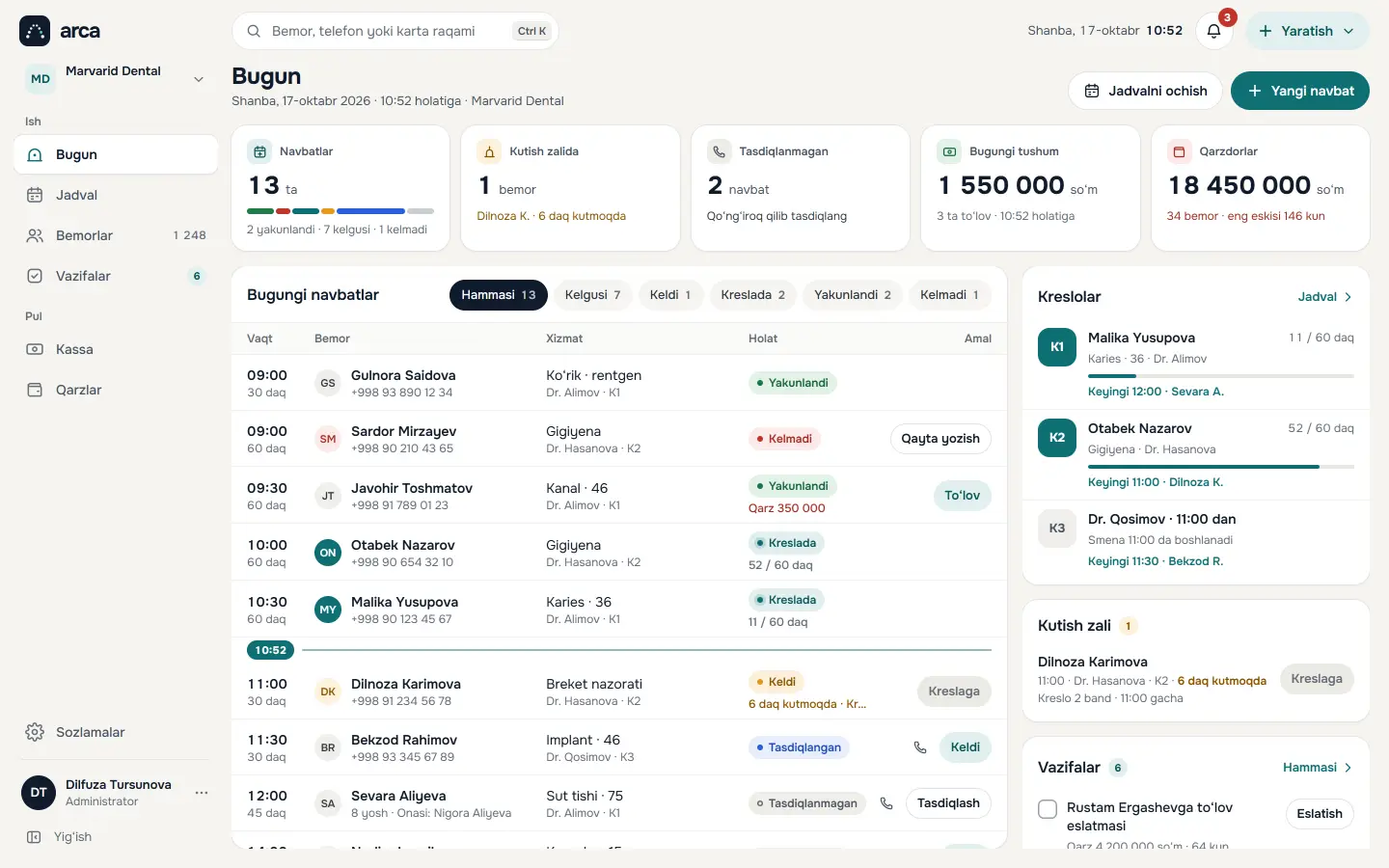
The screens show a sample clinic with sample data. The app interface is currently in Uzbek; the labels in the illustrations are translated.
Today’s appointments, the waiting room, chairs and tasks on one screen.
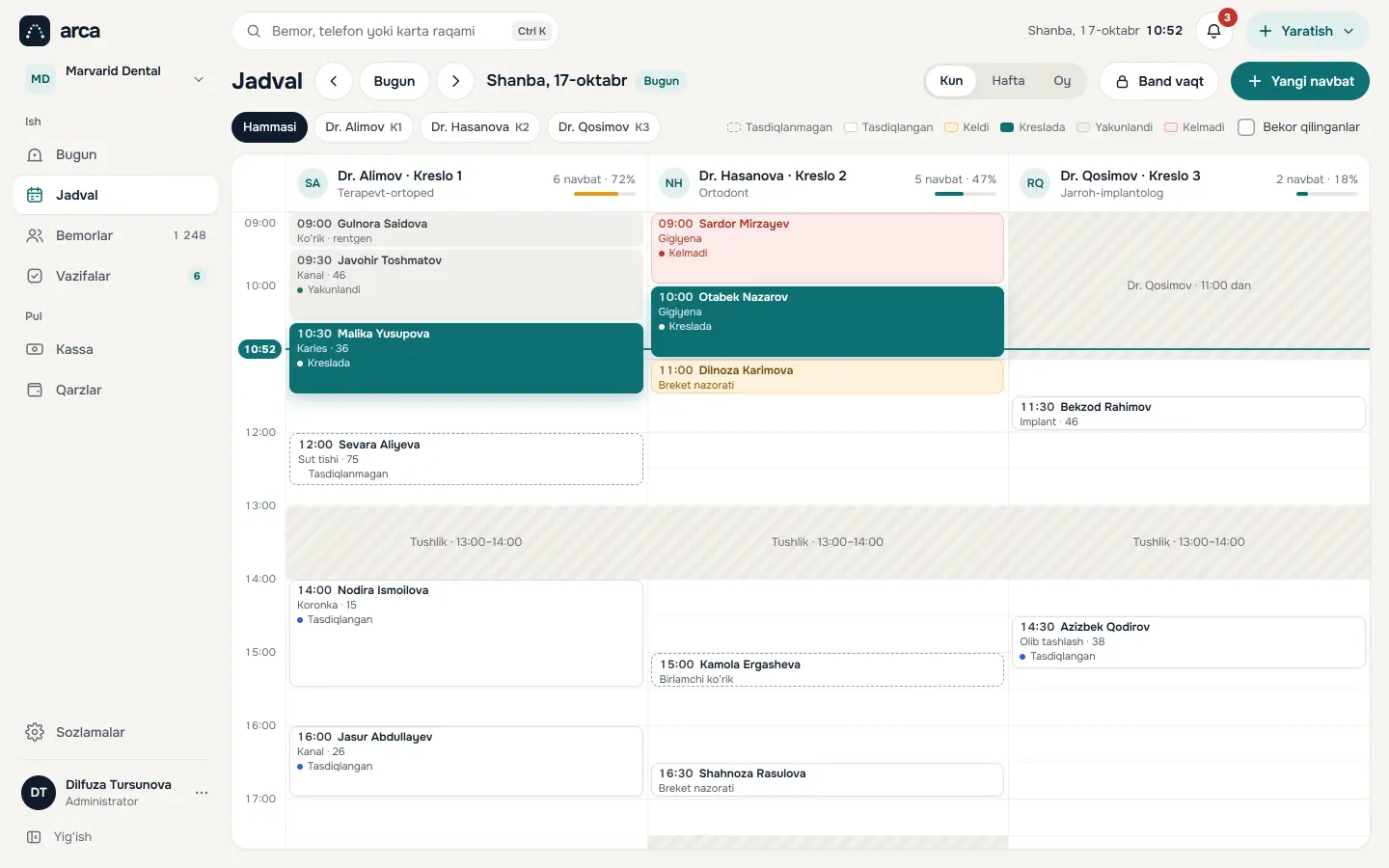
The screens show a sample clinic with sample data. The app interface is currently in Uzbek; the labels in the illustrations are translated.
Each doctor and chair has its own column. Drag an appointment to another time with the mouse.
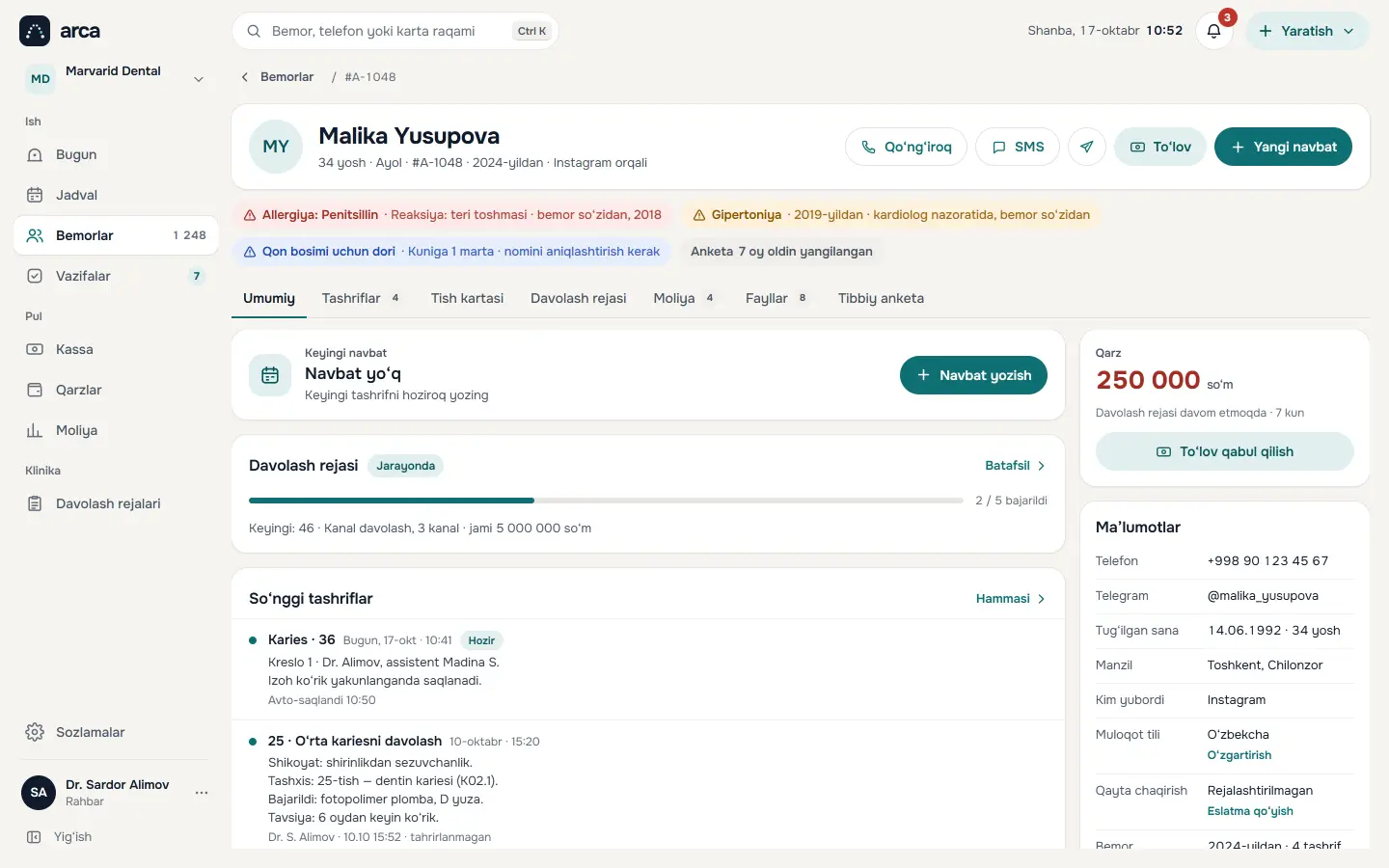
The screens show a sample clinic with sample data. The app interface is currently in Uzbek; the labels in the illustrations are translated.
Visits, the treatment plan and the balance in one record.
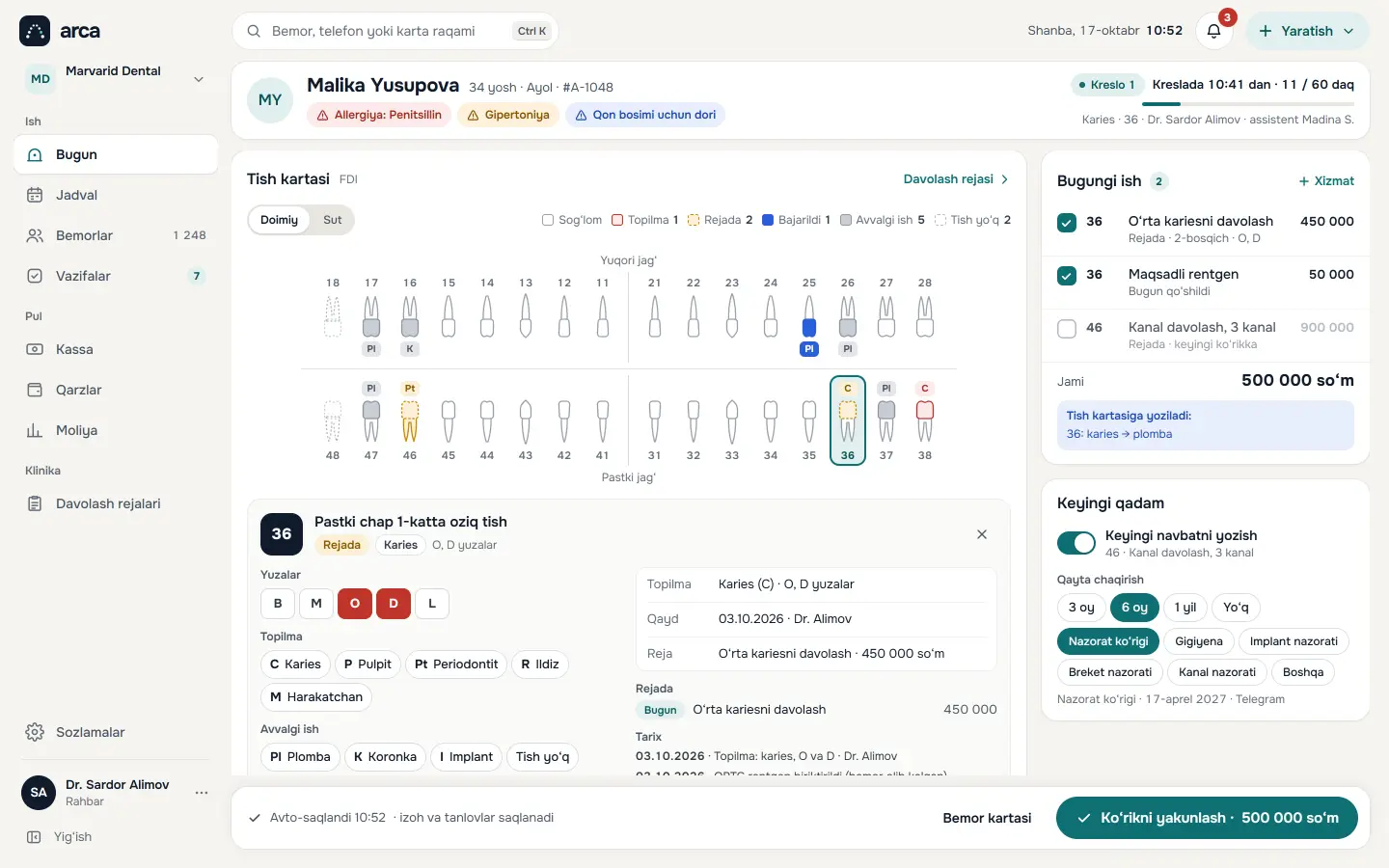
The screens show a sample clinic with sample data. The app interface is currently in Uzbek; the labels in the illustrations are translated.
The doctor marks tooth conditions, ticks the work done and completes the exam with one button.
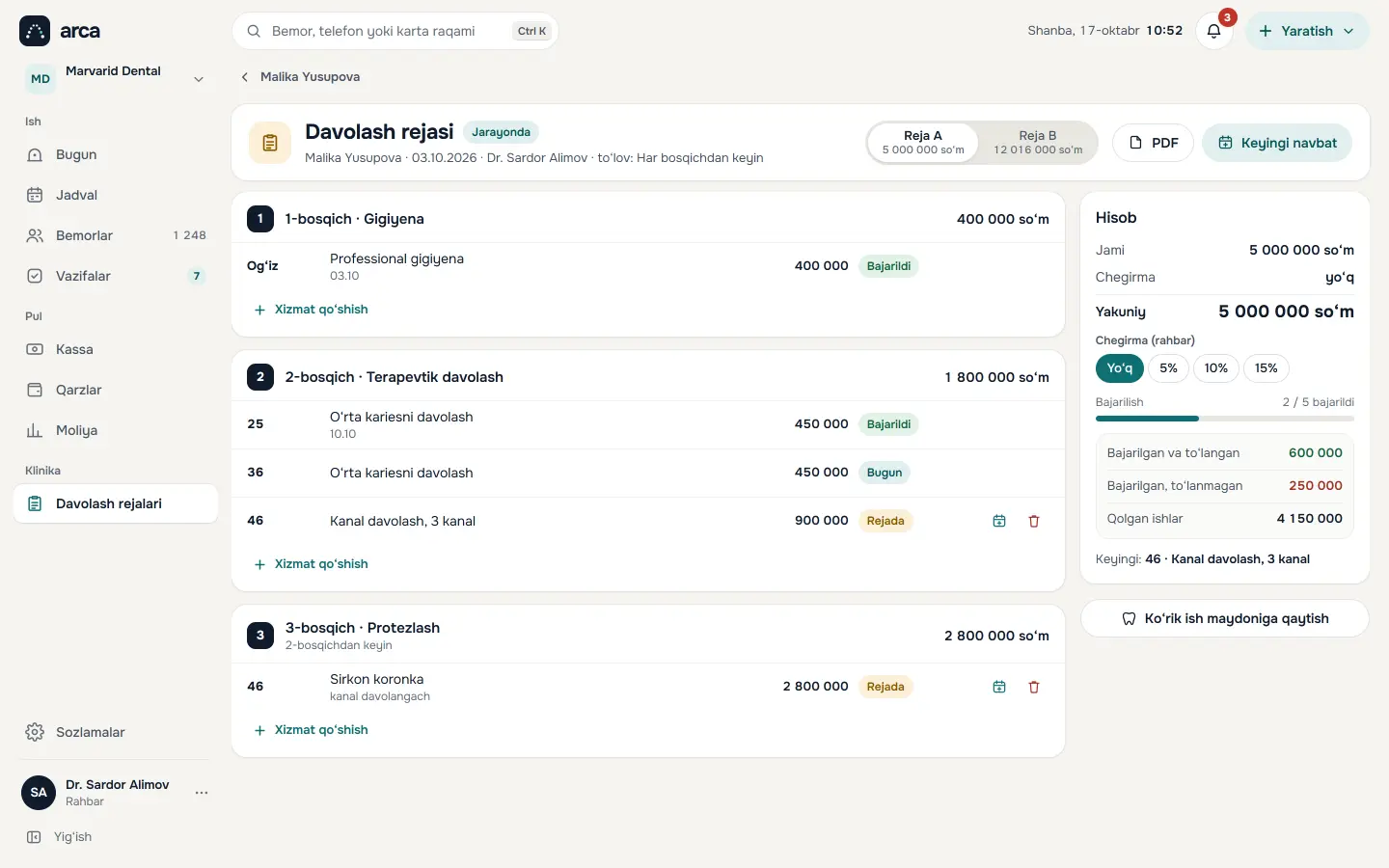
The screens show a sample clinic with sample data. The app interface is currently in Uzbek; the labels in the illustrations are translated.
Stages, prices and an alternative option. Print the plan or save it as a PDF.
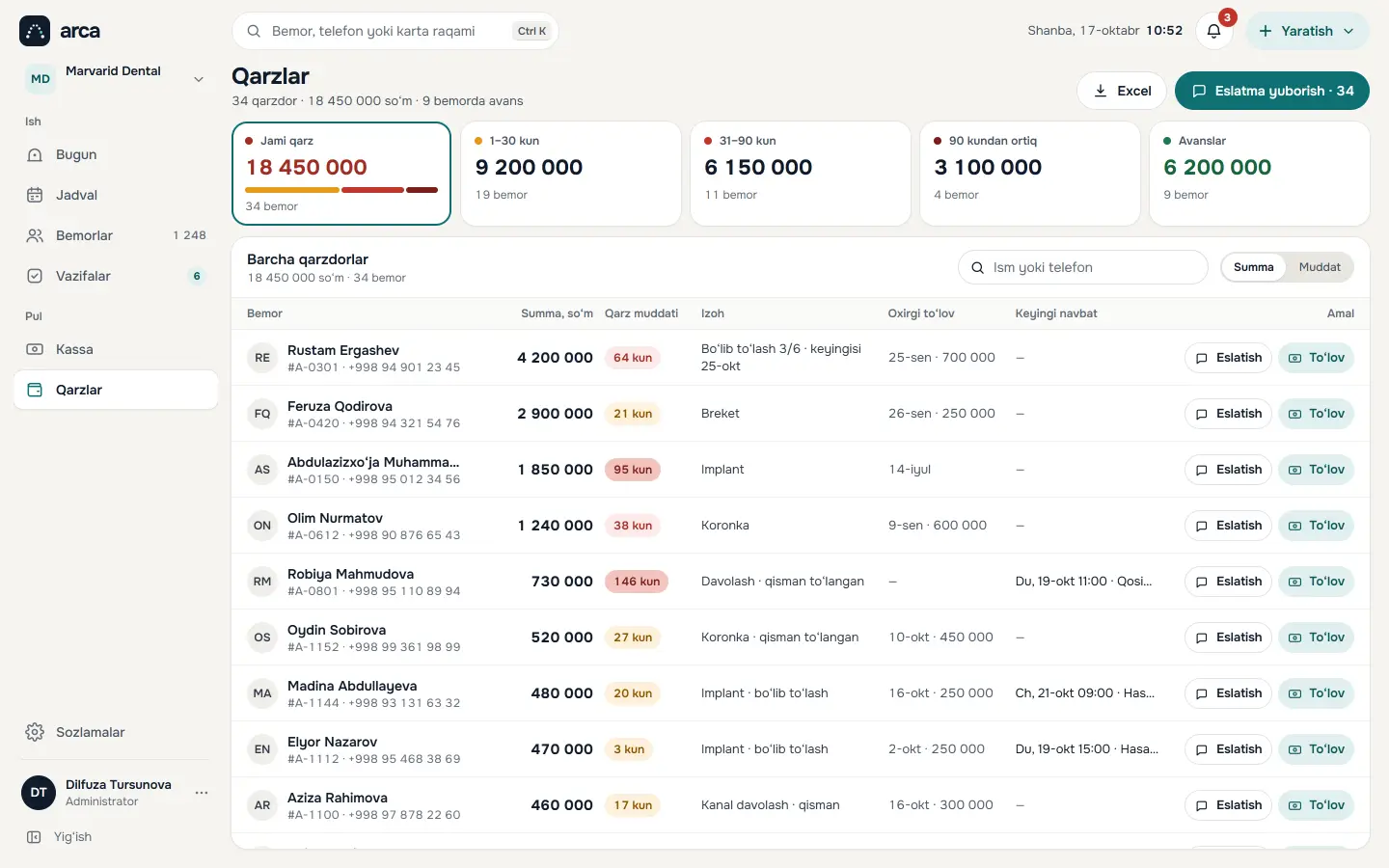
The screens show a sample clinic with sample data. The app interface is currently in Uzbek; the labels in the illustrations are translated.
Debts are grouped by how overdue they are. Remind one patient or all of them at once.
Mobile app
An app for Android, with iPhone coming soon. Every team member sees their own screen on their phone.
Today’s appointments, the waiting room and chairs. Income and debts are in the Finance section.
Booking, marking a patient as arrived and taking payments.
The current patient, the next appointments and what needs to be done.
Appointments and tasks for their chair. Prices and payments are hidden.


The screens show a sample clinic with sample data. The app interface is currently in Uzbek; the labels in the illustrations are translated.
Day, week and month. Tap a free slot to book a patient.
The condition and history of every tooth. Add X-rays and photos from the phone camera.
The app opens with a PIN, a fingerprint or face recognition.
Light or dark — whichever you prefer.
To install the app, message us — we will help.
Trust
You decide who works in which role, and sign-in is protected by an SMS code and a PIN.
Each team member sees only the sections for their role. The assistant never sees prices, payments or debts.
Sign-in is by phone number and an SMS code. On the phone the app locks with a PIN or a fingerprint, on the computer with a personal PIN.
The connection between the app and the server is encrypted. Data is used only for the clinic’s work.
We do not sell data, show ads or use tracking tools.
Export the patient list and reports to Excel or PDF.
Most actions — moving an appointment, completing a visit, editing the tooth chart — can be undone within a few seconds.
Pricing
Questions and answers
Didn’t find your answer?
Message on Telegram (opens in a new tab)Arca is an app for dental clinics. The appointment schedule, patient reminders, patient records, payments and debts are kept in one system. It is used by the clinic’s team: the owner, doctors, administrators and assistants.
For small and mid-sized dental clinics — places with a few chairs and a few doctors.
Yes. If the connection drops, you keep booking and marking appointments: changes are saved on the device and sent automatically once you are back online. Taking a payment needs a connection.
Sign-in is by phone number and an SMS code, and the app locks with a PIN on the device. Each team member sees only the data for their role. More in the privacy policy.
Yes. There is a desktop app for the front desk that installs on a Windows computer. The phone and the computer show the same data.
The number of team members depends on your terms. You invite them from the app yourself and give each one a role: doctor, administrator or assistant. Ask us for the exact number for your clinic.
The app interface is currently in Uzbek (Latin script). Messages to patients are sent in Uzbek or Russian, depending on the patient’s language.
Message us — we will show you the app and help you install it. Then you register your clinic in the mobile app, invite your team and start booking appointments.
Message us and we will explain the terms.
Didn’t find your answer?
Message on Telegram (opens in a new tab)Demo
Send a request and we will show you the app and answer your questions.
If Telegram opened, press Send. If it did not, use the button below.
The message is too long to be filled in for you. Copy the text, paste it into the Telegram chat and send it.
We will get back to you soon.
Check your connection and try again, or message us on Telegram.
Demo request
Message on Telegram (opens in a new tab)